 FPMatrixFor shop owners ↗
WEEKEND PHOTO ZINE KIT · FREE v0.1.1 TRIAL
Your photos.
Your little magazine.
A weekend away, a family day, or small moments at home. Turn 2–12 photos into pages you can save and revisit.
Open the free photo zine editor ↗Download the offline kit · ZIP, v0.1.1No signup or payment. Desktop Chrome recommended.
The editor starts with four original illustrations; replace them with your own photos.
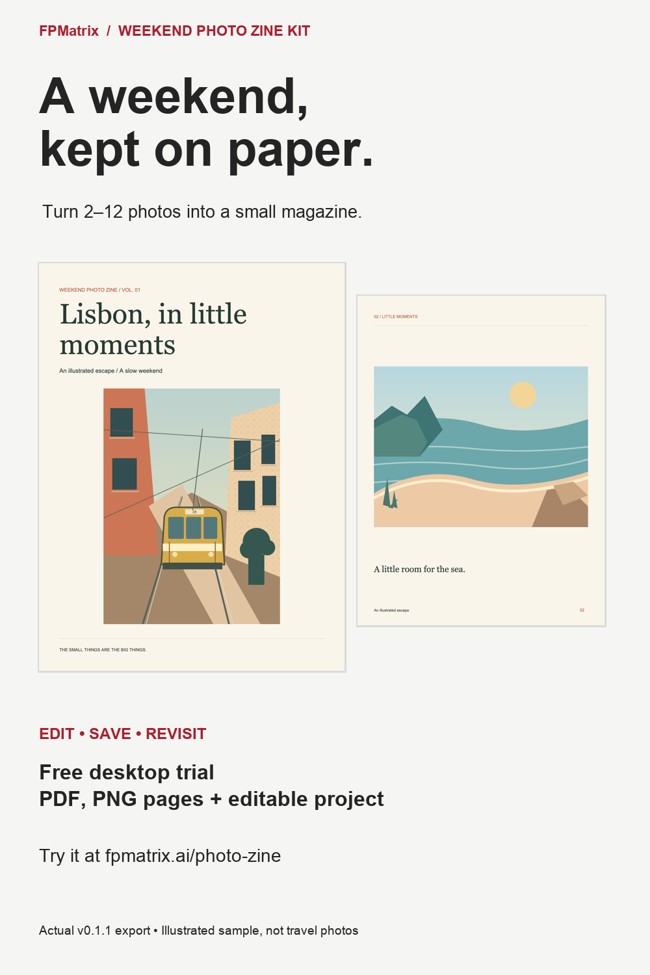
1. Choose your photos
Import 2–12 JPG, PNG or WebP images. Full-photo placement keeps every edge by default.
2. Make it yours
Choose one of three layouts, edit your title and captions, reorder pages, or crop a photo intentionally.
3. Keep your book
Export A4 / US Letter PDF, 1440 × 1920 PNG pages, or a project JSON to reopen and edit later.
Make one keepsake you will actually use
Choose six photos from one trip or day (the built-in demo is fine for testing). Edit one caption, export a PDF, then open the saved file and check each photo.
Next, choose one real use: keep it in your travel folder, share it with someone you choose, or try printing it. Tell us what you actually did, separately from what you might do later. Printing and sharing are optional; physical printing has not been verified by us.
Watch the six-photo walkthrough on YouTube (opens YouTube).
Report your result or where you stopped. No photos needed. Feedback is not a marketing subscription. The editor and existing offline ZIP remain free.
“PDF prepared” is not the same as “file saved”
Open the downloaded file before you close the editor. A ready message means the document has been prepared; it cannot confirm that your browser saved it.
- Use the export download link. If your browser asks where to save, choose a folder you can find again.
- Check your browser’s Downloads list or the folder you selected. Open the PDF from there, rather than relying on an editor preview.
- Check every page: are the photos, captions and page order what you expected? Keep the editor open if the file is missing or incomplete.
- If you want to edit later, also choose Save project and keep the project JSON. A PDF is a viewing/printing copy; it is not the editable project. Keep your original photos separately.
What if there is no downloaded file?
Check whether your browser is waiting for you to approve or choose a download location. A preview tab alone is not a saved file. Desktop Chrome is our tested path; if an in-app browser cannot download, use desktop Chrome. Photos and edits do not transfer automatically between devices, so do not close your current editor until you have secured a usable file.
Can I rely on phone saving?
We have not verified saving on a physical iPhone or Android phone, or in Safari and Firefox. This guide does not claim those paths work. You do not need to send us private photos to report a problem; the browser, the step that failed and any error message are enough.
FPMatrix makes this tool. These checks do not require a purchase or signup. Updated 16 October 2026.
A small first edition
PDF output is one page per sheet, with white margins. It is a raster PDF; booklet folding, professional bleed, HEIC import and cloud sharing are not included.
Save and check your files before closing. The editor resizes photos to a maximum 1800-pixel edge; keep your originals. Real phone saving, physical printing and Safari / Firefox have not yet been verified.
We're looking for a few travel or photo hobbyists to complete a first book. Tell us whether you exported it and the first step that felt unclear. Please send browser/version and feedback only; private photos are not needed. AI tools assisted with code and text; the demo illustrations and layouts are original.
Your photos stay in your browser
Photo and project contents are processed locally in memory. No AI API or photo-upload service is used.
The hosted editor offers an optional, unchecked action-count checkbox. If enabled, our own hosting receives only action names and a test flag. We store unlinked receipts by day and product for starts, books ready, export requests and your voluntary saved-file confirmation. They are action counts, not unique people, and do not prove a file was automatically saved. No photos, project text, cookies or persistent visitor identifiers are collected by this counting code. Hosting processes ordinary web requests. You can uncheck it to stop future counts; prior anonymous counts remain. The offline ZIP contains no counting.
Want Photo Zine updates?
Request occasional emails about new layouts and Photo Zine product updates. This is optional: the free trial and downloads stay open without an email.