FPMatrix · download & export guide · fictional Studio Sunday examplesFrom one ZIP to matching market signs
This is a desktop browser tool, not a Canva template or a physical printed set.
1. Unzip the complete folder
Keep its files together. Open app/index.html in desktop Chrome. On Windows, use Extract All first; on Mac, unzip the download first. If the page has no styling or buttons do not work, check that you extracted the whole folder rather than opening a file inside the ZIP. No account or AI credits are needed.
2. Replace the sample shop and products
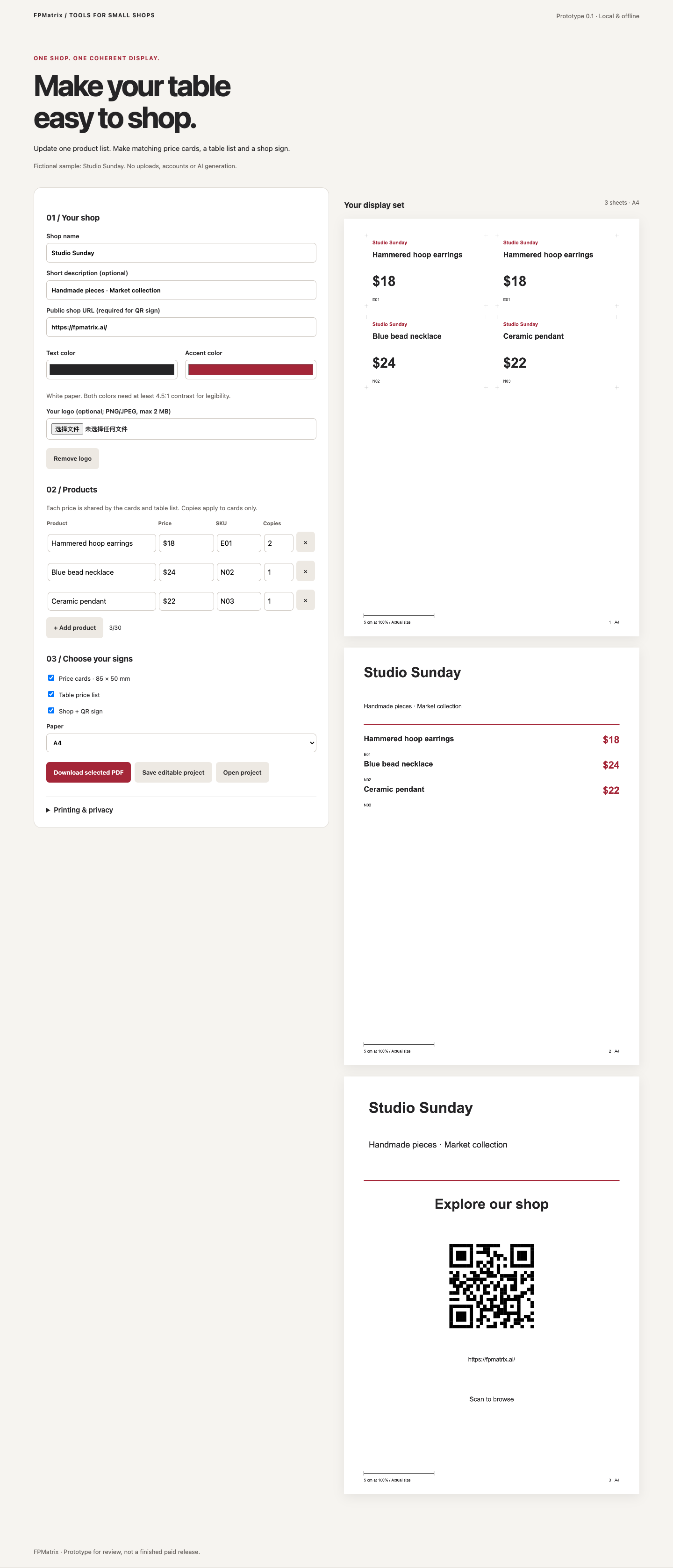
Enter your own product names, prices and public HTTPS shop URL. Copies changes the number of price cards; it does not duplicate products in the table list.
3. Export a PDF and keep an editable backup
Choose A4 or Letter. Save the PDF for printing and a JSON project for later editing. There is no automatic draft storage.
See the fictional Letter PDF examplePrint one page at Actual size / 100%, measure the 5 cm reference line, and test the printed QR before displaying it. The QR opens your shop; it does not accept payments.
Do you need the paid kit?
The free Market Day Price Kit already includes basic price cards, a table list and JSON backup. The separate $7 Market Display Kit adds coordinated brand settings and a shop QR sign.
Desktop Chrome tested. Physical printing, phone-camera scans, Safari and Firefox remain unverified. PDFs are rasterized, not editable vector templates.
View the $7 kit and full compatibility details · Free print-size check
Made by FPMatrix with AI-assisted development. Examples are fictional; no customer results are implied.